Gaming Laptops Buying Guide: How to Choose the Right Gaming Laptop
Modern games are no longer lightweight pieces of software. Today’s titles demand serious processing power, advanced graphics, fast storage, and reliable thermal performance. To buy a gaming laptop, prioritize the GPU & CPU (NVIDIA RTX/AMD Radeon, Intel Core i7+/Ryzen 7+) for performance, aim for at least 16GB RAM, a 1080p (FHD) or higher resolution screen with a high refresh rate (144Hz+), fast SSD storage, and a strong cooling system, balancing specs with your budget and focusing on real-world reviews and sales rather than just RGB lighting.
If you have ever tried running a high-end game on a regular laptop, you already know the frustration lag, overheating, frame drops, and constant compromises. A gaming laptop is designed to remove those limits. But with dozens of brands, hundreds of configurations, and confusing specifications, choosing the right gaming laptop can feel overwhelming.
This Gaming Laptops Buying Guide is written to remove that confusion completely. By the time you finish reading, you will understand exactly what to look for, what to avoid, and how to invest in a gaming laptop that delivers real value for years, not just impressive specs on paper.
What Makes a Laptop a True Gaming Laptop?
A gaming laptop is built for sustained high performance. Unlike standard laptops, it uses dedicated hardware designed to handle intense graphics, heavy multitasking, and long gaming sessions without breaking down.
Key differences include:
- A dedicated graphics card (GPU) instead of basic integrated graphics
- High-performance multi-core processors (CPU)
- Advanced cooling systems for thermal control
- High refresh-rate displays for smooth visuals
- Stronger build quality and better connectivity
If gaming matters to you even casually these differences are not optional. They directly impact how games look, feel, and respond.
Gaming Laptop Components Explained
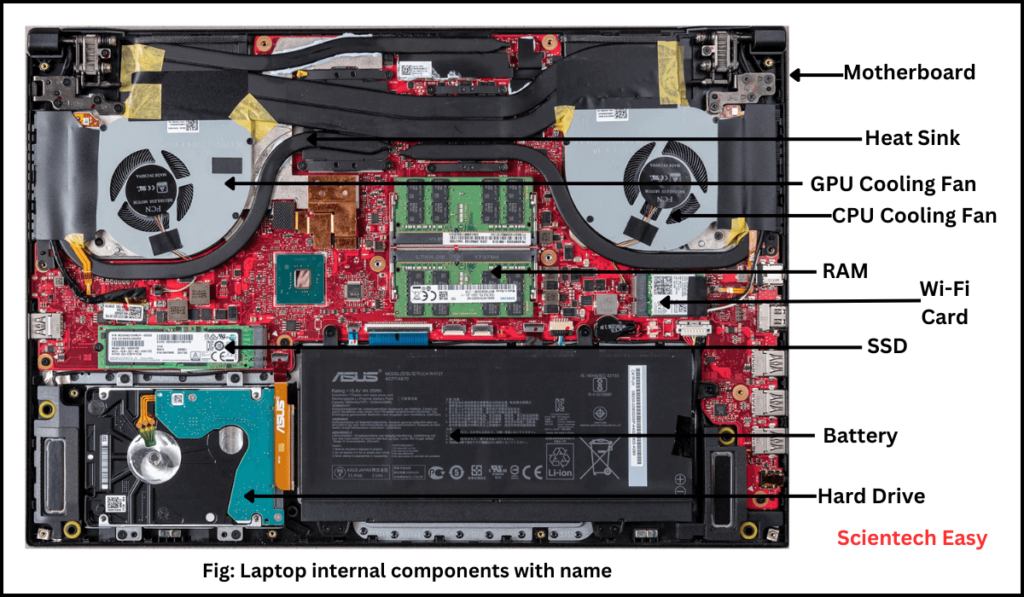
Graphics Card (GPU): The Core of Gaming Performance
The GPU is the most important component in any gaming laptop. It controls textures, lighting, shadows, and overall visual smoothness. A weak GPU bottlenecks everything, no matter how good the rest of the system looks.
Modern gaming laptops rely on:
- NVIDIA GeForce RTX series
- AMD Radeon RX series
These GPUs support advanced features like ray tracing and AI-based upscaling, which dramatically improve visual quality and frame stability.
When choosing a GPU, focus on:
- The tier, not just the name
- VRAM capacity, which affects texture quality
- Real-world performance for the games you play
Spending wisely here ensures your laptop stays relevant longer and delivers consistent performance without constant settings compromises.
Processor (CPU): Powering Everything Behind the Scenes
While the GPU handles visuals, the CPU controls game logic, physics, background tasks, and system responsiveness. A weak processor causes stuttering, slow loading, and poor multitasking even with a strong GPU.
Modern gaming laptops typically use:
- Intel Core i5, i7, or i9
- AMD Ryzen 5, 7, or 9
Look for:
- Newer generations for efficiency and stability
- Multiple cores for modern game engines
- Strong single-core performance for competitive gaming
A balanced CPU-GPU combination always outperforms mismatched specs.
RAM and Storage: Speed You Can Feel
RAM and storage do not attract attention, but they silently shape your experience.
For gaming laptops:
- 8GB RAM is the bare minimum
- 16GB RAM is the ideal sweet spot
- 32GB is useful for heavy multitasking and content creation
Storage matters just as much. SSDs dramatically reduce boot times, game loading, and system lag. NVMe SSDs offer the best performance and are now standard in quality gaming laptops.
Choose models that allow future RAM and storage upgrades. This single feature can extend your laptop’s lifespan by years.
Display Quality: Where Performance Meets Immersion
A powerful gaming laptop deserves a display that can keep up. Display quality directly affects immersion, reaction time, and visual comfort.
Important factors include:
- Resolution (1080p remains the most balanced choice)
- Refresh rate (144Hz or higher for smooth motion)
- Panel type (IPS or OLED for better color accuracy)
- Response time to reduce motion blur
Higher refresh rates make gameplay feel smoother and more responsive, especially in fast-paced games. Once experienced, it is difficult to go back.
Cooling System and Thermal Performance
Heat is the silent enemy of gaming laptops. Poor cooling leads to throttling, reduced performance, and long-term hardware damage.
A well-designed gaming laptop uses:
- Dual-fan or multi-fan cooling
- Heat pipes or vapor chamber systems
- Intelligent fan control software
Good cooling keeps performance stable during long gaming sessions. It also protects your investment. Never ignore thermal design when comparing models.
Ports, Connectivity, and Peripheral Support
Gaming laptops must support more than just games. Mice, keyboards, headsets, external displays, and controllers all depend on reliable connectivity.
Look for:
- Multiple USB-A and USB-C ports
- HDMI or DisplayPort for monitors
- Ethernet for stable online gaming
- High-speed ports with low input latency
Strong connectivity ensures your gaming setup performs exactly as intended, without bottlenecks or delays.
Customization and Upgrade Potential
Modern gaming laptops are more flexible than ever. Many allow:
- RAM upgrades
- SSD expansion
- Performance tuning through software
RGB lighting, keyboard customization, and performance profiles let users personalize both appearance and behavior. Some advanced models even support external GPUs (eGPUs), offering desktop-level graphics through external enclosures.
If longevity matters, prioritize models designed with upgrades in mind.
Size, Weight, and Portability Trade-Offs
Larger gaming laptops offer better cooling and larger displays, but they sacrifice portability. Smaller models travel easily but may run hotter or limit upgrades.
Choose based on how you will actually use the laptop:
- Desk-focused gaming favors larger screens
- Students and travelers benefit from lighter designs
There is no universal best size only the best fit for your routine.
Price Tiers & Examples (Pakistan Market – Jan 2026)
- Entry-Level (Budget-Friendly)
- Price: ~PKR 170,000 – 250,000.
- Models: HP Victus, Lenovo LOQ, Acer Nitro.
- Specs: Core i5/Ryzen 5, RTX 3050/4050.
- Mid-Range (Value for Money)
- Price: ~PKR 250,000 – 450,000.
- Models: HP Omen, Lenovo Legion 5, Asus TUF Gaming.
- Specs: Core i7/Ryzen 7, RTX 4060/4070, 16GB+ RAM, 1TB SSD.
- High-End/Premium (AAA Gaming)
- Price: PKR 500,000 – 1,000,000+.
- Models: Dell Alienware, Lenovo Legion Pro/Ultra, Acer Predator Helios, Asus ROG.
- Specs: Core i9/Ryzen 9, RTX 4080/4090, 32GB+ RAM, QHD 240Hz+ OLED displays.
Key Factors Affecting Price
- GPU (Graphics Card): Most significant price driver (e.g., RTX 4060 vs. 4090).
- Processor (CPU): Intel Core i7/i9 or AMD Ryzen 7/9.
- RAM & Storage: 16GB/32GB+ RAM, 1TB+ SSD.
- Display: Refresh rate (165Hz, 240Hz) and type (OLED, IPS).
Meet the Gaming Laptop Brands: Who Builds What Best for Gamers?
Once you have defined your budget, the next important step is choosing the right gaming laptop brand. Different manufacturers focus on different strengths, some prioritize raw gaming performance, others focus on cooling efficiency, build quality, or long-term reliability. Understanding what each brand does best helps you choose a gaming laptop that matches your play style, performance needs, and budget.
Here’s a quick overview of the most trusted gaming laptop brands available in Pakistan and what they are best known for:
Asus
A leader in gaming innovation, Asus is best known for its ROG (Republic of Gamers) and TUF Gaming series, offering excellent performance, advanced cooling, and high-refresh-rate displays for competitive gamers.
Lenovo
Lenovo’s Legion series is praised for balanced performance, strong cooling, clean design, and excellent value for money. It is one of the most reliable choices for long gaming sessions.
HP
HP offers a wide gaming lineup through its Victus and OMEN series, covering budget to high-end gaming laptops with solid thermals and good after-sales support in Pakistan.
Dell
Dell’s Alienware brand is built for premium gaming, focusing on high-end performance, advanced thermal design, and futuristic aesthetics. Ideal for gamers who want flagship power.
Acer
Acer is known for affordable gaming laptops in its Nitro series and high-performance machines in the Predator Helios lineup, making it popular among budget and mid-range gamers.
MSI
MSI is a gaming-focused brand that delivers high-performance laptops with powerful GPUs, fast displays, and advanced tuning options, especially favored by enthusiast and competitive gamers.
Razer
Razer targets premium gamers with its Blade series, combining sleek design with strong performance. These laptops are ideal for users who want power in a slim, premium form factor.
Now that you understand which brands specialize in gaming performance, cooling, and value, let’s move on to the most important component inside a gaming laptop: the processor (CPU).
Gaming Laptop vs Gaming PC: Which Is Right for You?
Gaming PCs still offer maximum power and upgrade freedom. Gaming laptops offer performance with portability.
If you value flexibility, mobility, and a single powerful machine, a gaming laptop is the smarter choice. It delivers strong performance without tying you to one location.
Common Mistakes to Avoid When Buying Gaming Laptops
Many buyers overspend or underperform due to avoidable mistakes:
- Choosing flashy design over cooling quality
- Ignoring GPU tier and VRAM
- Buying outdated processors
- Overlooking upgrade options
Smart buyers focus on balance, not marketing hype.
Final Thoughts: Buying a Gaming Laptop
A gaming laptop is not just a purchase it is an investment in performance, reliability, and enjoyment. When you understand GPUs, CPUs, cooling, displays, and upgrade paths, the decision becomes clear instead of confusing.
This Gaming Laptops Buying Guide is designed to help you choose with confidence, avoid regret, and get real value from your money. Whether you are upgrading or buying your first gaming laptop, the right choice will reward you every time you power it on.
Explore the latest gaming laptops on mega.pk and choose a system that delivers power, balance, and long-term satisfaction without compromise.
Explore More laptops Guides: Chips, Models & Prices in 2026
Before buying or upgrading in 2026–2027, explore Mega.pk’s detailed Apple guides:
- Ultimate Guide to Buying a Laptop in Pakistan
- Gaming laptop Vs gaming PC
- How to Boost Laptop Performance for Gaming
- Updated MacBook Prices in Pakistan
- Complete MacBook Buying Guide
FAQs
What is the best budget gaming laptop price range in Pakistan in 2026?
Entry-level gaming laptops in Pakistan cost around PKR 170,000 to 250,000. Models like HP Victus, Lenovo LOQ, and Acer Nitro offer solid 1080p gaming performance with Core i5 or Ryzen 5 processors and RTX 3050 or 4050 GPUs, making them ideal for beginners.
Which gaming laptops offer the best value for money in Pakistan?
Mid-range gaming laptops priced between PKR 250,000 and 450,000 provide the best balance of performance and price. Popular options such as HP Omen, Lenovo Legion 5, and Asus TUF Gaming feature Core i7 or Ryzen 7 CPUs, RTX 4060 or 4070 GPUs, 16GB+ RAM, and fast SSD storage.
How much do high-end gaming laptops cost in Pakistan and who should buy them?
High-end gaming laptops start from PKR 500,000 and can exceed PKR 1,000,000. Premium models like Alienware, Lenovo Legion Pro/Ultra, Acer Predator Helios, and Asus ROG are built for AAA gaming, streaming, and content creation, offering RTX 4080 or 4090 GPUs, flagship CPUs, and high-refresh-rate QHD or OLED displays.
What are the most important specs to look for in a gaming laptop?
The most important specs in a gaming laptop are the GPU, CPU, and cooling system. The GPU has the biggest impact on gaming performance, followed by the processor to avoid bottlenecks, and effective cooling to prevent thermal throttling during long gaming sessions.
Which GPU is best for a gaming laptop in 2026?
For modern gaming, aim for at least an NVIDIA GeForce RTX 40-series or AMD Radeon RX 7000-series GPU. Models like RTX 4060, RTX 4070, RTX 5060, and RTX 5070 Ti offer excellent performance for 1440p gaming, while higher-tier GPUs are required for smooth 4K gameplay.
How much RAM do I need in a gaming laptop?
16GB of RAM is the ideal minimum for smooth gaming and multitasking. If you plan to stream, edit videos, or run heavy applications alongside games, 32GB RAM is recommended. Using dual-channel RAM improves performance and stability.
What display should I choose for a gaming laptop?
A 144Hz or higher refresh rate display is recommended for smooth gameplay. 1080p is best for competitive gaming, 1440p offers the best balance of clarity and performance, and 4K is ideal for story-based games but requires a high-end GPU. IPS panels are reliable, while OLED or Mini-LED offer premium visuals.
Do gaming laptops overheat and how can it be avoided?
Gaming laptops can overheat if cooling is weak. Choosing a laptop with dual-fan cooling, heat pipes, or vapor chamber designs helps prevent overheating and performance drops. Good airflow and strong thermal design are essential for maintaining consistent gaming performance.