How to Check Battery Cycles on MacBook – Complete Guide
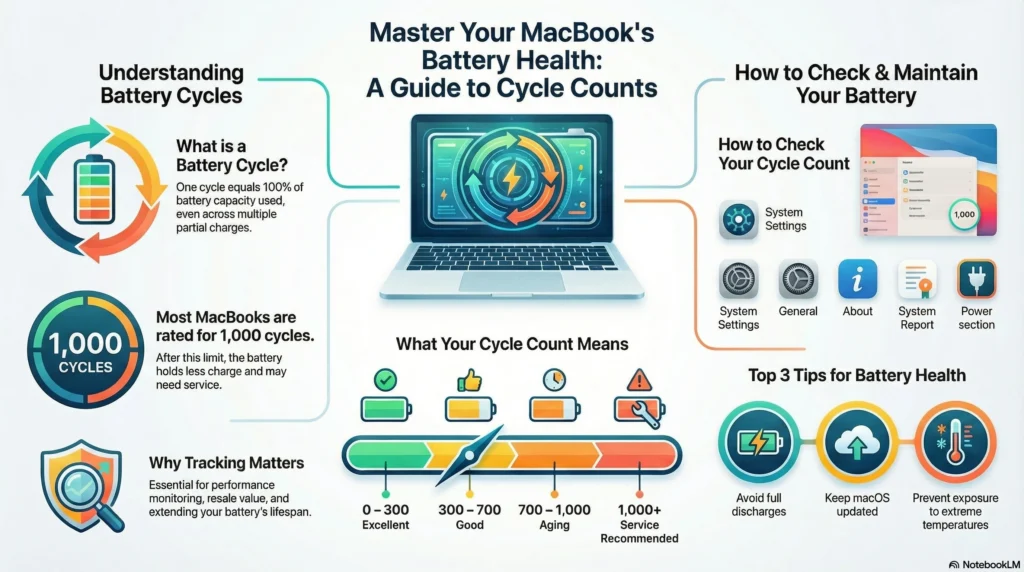
Your MacBook is an investment, and maintaining battery health is essential for performance, lifespan, and resale value. Knowing how to check battery cycles on MacBook helps you track battery wear and understand how your device ages over time.
Whether you want to check battery cycles on MacBook for long-term use, resale planning, or general health monitoring, this guide provides clear steps, expert insight, and practical tips. By the end, you will know exactly where to find battery cycle data, what the numbers mean, and how to keep your MacBook battery performing at its best.
Why Checking Battery Cycles on MacBook Matters
If you’re a long-time MacBook user, planning to sell your device, or simply want better battery performance, this guide explains:
- How to check battery cycles on any MacBook
- What cycle count means
- When to replace the battery
- Expert tips to maintain long-term battery health
What Are MacBook Battery Cycles?
A battery cycle refers to using 100% of your MacBook’s battery capacity. This doesn’t mean one full charge in a single session; partial charges count too. For example, using 50% of your battery two times equals one full cycle.
Apple designs MacBook batteries to endure roughly 1,000 cycles for most models. Once this threshold is approached, the battery’s full charge capacity starts to decline gradually. Understanding battery cycles helps prevent unexpected shutdowns and gives you insight into your device’s long-term health.
Apple’s Standard Battery Cycle Limit
Most MacBooks from 2010 onward are rated for up to 1,000 battery cycles.
After crossing this limit, your battery may begin to:
- Hold less charge
- Drain faster
- Affect performance
- Require replacement
Understanding your cycle count helps you predict when your battery may need service.
Why Tracking Battery Cycles Is Essential
Tracking battery cycles is more than just curiosity; it’s essential for:Performance Monitoring: Keep your MacBook running efficiently and avoid sudden shutdowns.
- Buying and Selling: A verified cycle count ensures transparency for resale or purchase.
- Battery Longevity: Adjust your charging habits based on cycle count to extend battery life.
Regular monitoring empowers you to make informed decisions about usage, replacement, and maintenance, ensuring your MacBook remains a reliable tool for years to come.
How to Check Battery Cycles on MacBook (Step-by-Step Guide)
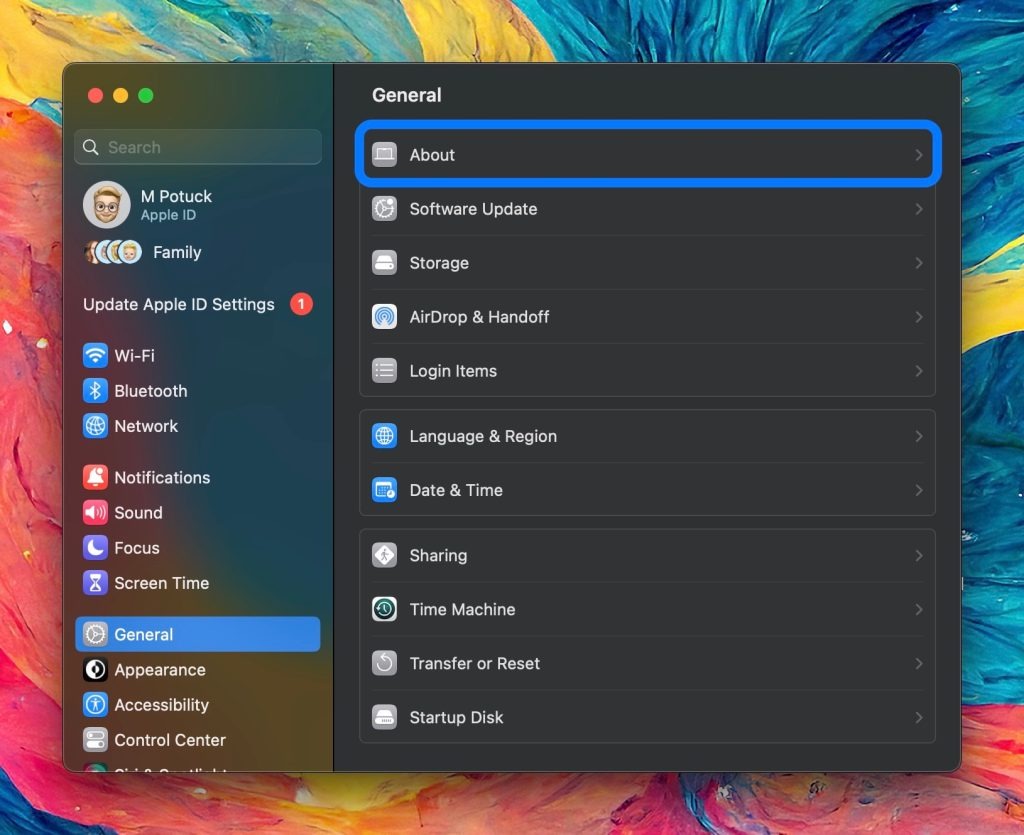
- Open the System Settings app on your MacBook
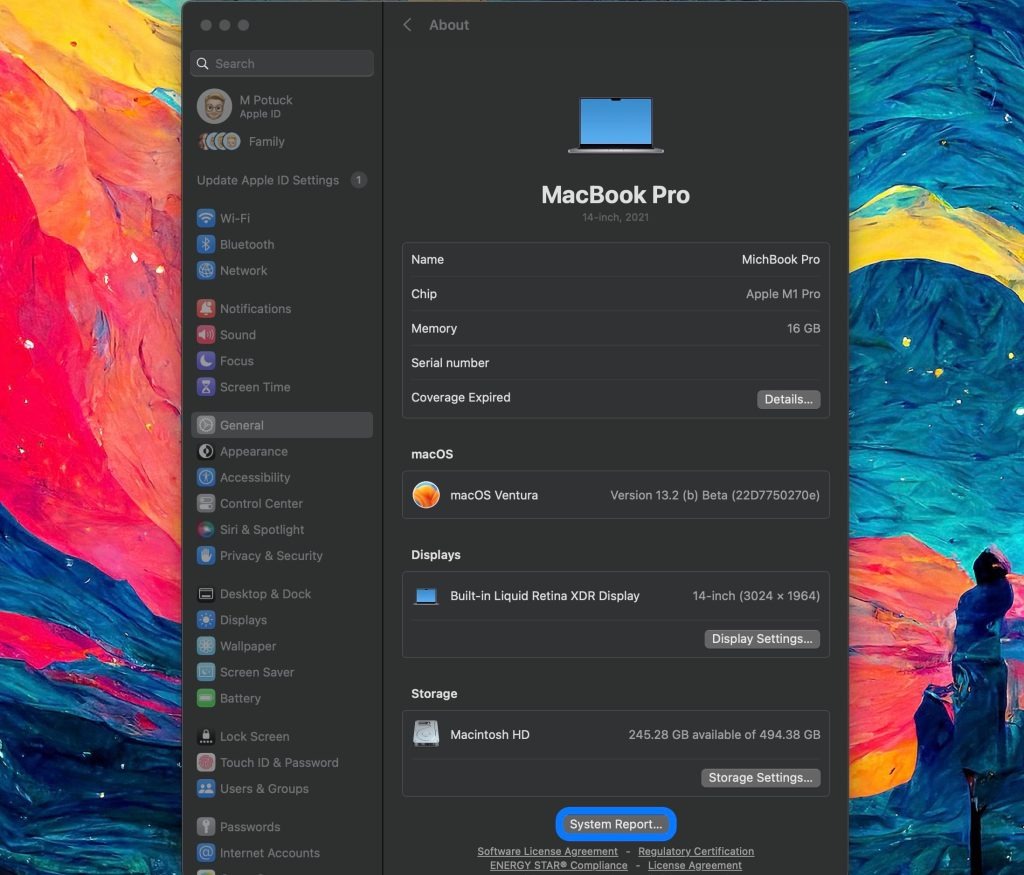
- Choose General then About
- Scroll to the very bottom and click System Report…
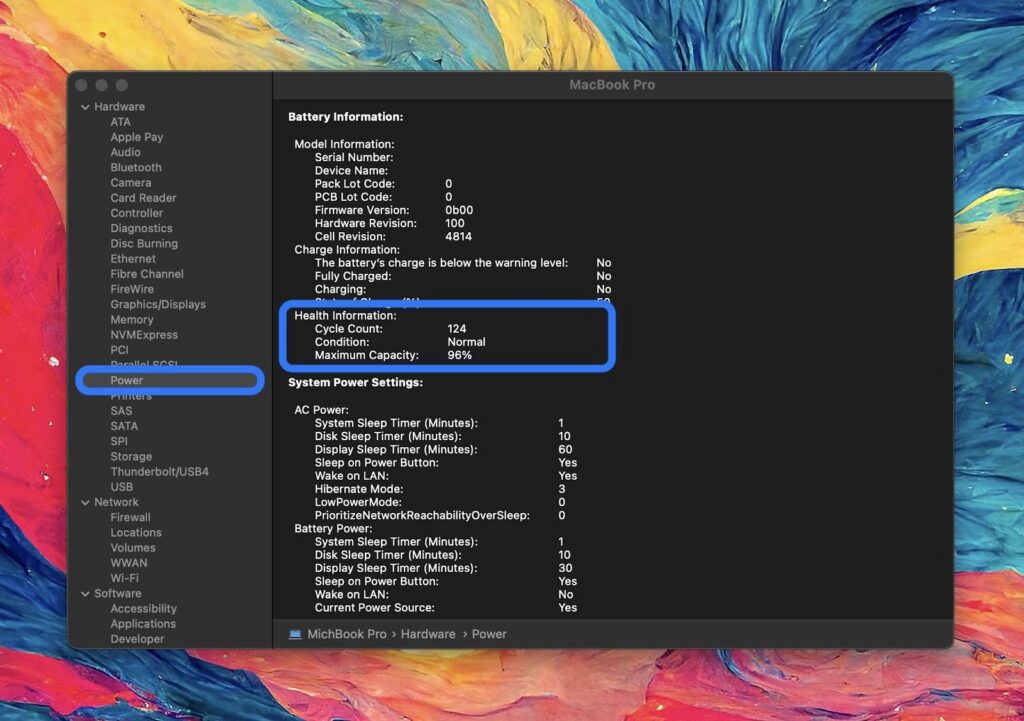
- On the left sidebar, click Power
- You’ll find your battery cycle count under Health Information:
In macOS Sonoma you can also see your battery health (capacity) this way:
- Open the System Settings app on your MacBook
- Choose Battery
- Click the circled “i” next to Battery Health
Here’s how the process looks:
On the left-hand sidebar, select Power. You’ll see your MacBook battery cycle count about halfway down along with the condition status and maximum battery capacity.
While many of Apple’s MacBooks since 2010 have batteries that are rated for 1,000 charge cycles, check this document to see details for each specific model.
What Your Cycle Count Means
To help you understand your number, here’s a simple interpretation chart:
| Cycle Count Range | Battery Condition | Meaning |
| 0 – 300 cycles | Excellent | Almost like new |
| 300 – 700 cycles | Good | Slight natural aging |
| 700 – 1,000 cycles | Aging | Capacity reduction noticeable |
| 1,000+ cycles | Service Recommended | Battery replacement likely needed |
Cycle count alone is not enough-you must also check:
- Maximum battery capacity (%)
- Condition status
- Battery drain behavior
A cycle represents 100% usage of your battery’s capacity. For instance, using 25% of the battery four times counts as one cycle. Most modern MacBooks are rated for around 1,000 cycles before significant capacity reduction occurs.
Monitoring cycle count:
- Predicts battery replacement needs.
- Indicates battery wear level.
- Helps maintain resale value.
Understanding this metric empowers you to take action before performance issues arise.
Understanding MacBook Battery Health
Your MacBook battery has two key metrics:
- Cycle Count: Total number of full charge-discharge cycles.
- Full Charge Capacity (mAh): Maximum charge the battery can hold.
When the cycle count nears Apple’s recommended limit, the battery’s full charge capacity declines. Tracking both metrics helps you decide when replacement or maintenance is necessary.
Tips to Maintain Your MacBook Battery
- Avoid full discharges: Partial charges reduce strain.
- Keep macOS updated: System updates optimize battery management.
- Moderate storage temperature: Extreme heat or cold damages batteries.
- Avoid 24/7 charging: Let the battery cycle naturally.
Common Battery Issues Related to Cycles
- Rapid battery drain.
- Unexpected shutdowns.
- Slower performance with high cycle count.
How to Replace Your MacBook Battery (If Needed)
- Use Apple-certified replacement for guaranteed performance.
- Third-party options exist but verify quality.
- Always backup and prepare your MacBook before battery replacement.
Expert Advice for Buyers and Sellers
- Always check battery cycles when buying a used MacBook.
- Ensure cycle count aligns with expected lifespan for resale or purchase.
- Proper monitoring increases trust and preserves resale value.
Explore More MacBook Guides: Chips, Models & Prices in 2026
Before buying or upgrading in 2025-2026, explore Mega.pk’s detailed Apple guides:
- Apple M5 vs M4 Chip Comparison
- MacBook Air vs MacBook Pro (Buying Guide)
- MacBook Pro 14-inch vs 16-inch Breakdown
- MacBook Model Identification (Serial Checker Guide)
- Updated MacBook Prices in Pakistan
- Complete MacBook Buying Guide
- What Is a MacBook? (Beginner Overview)
- Apple M3 chip
- Understanding the Apple M5 chip and Apple M4 chip
FAQs About MacBook Battery Cycles
How many cycles does a MacBook battery last?
Most MacBook batteries last around 1,000 cycles. Proper monitoring ensures replacement only when necessary.
Does a high cycle count mean the battery is bad?
Not necessarily. A high cycle count is normal; check full charge capacity to understand true battery health.
Can I reset the cycle count on a MacBook?
No. Cycle count reflects actual usage. Only replacing the battery resets it.
How often should I check battery cycles?
Check every few months or before buying/selling a MacBook to ensure accurate health assessment.